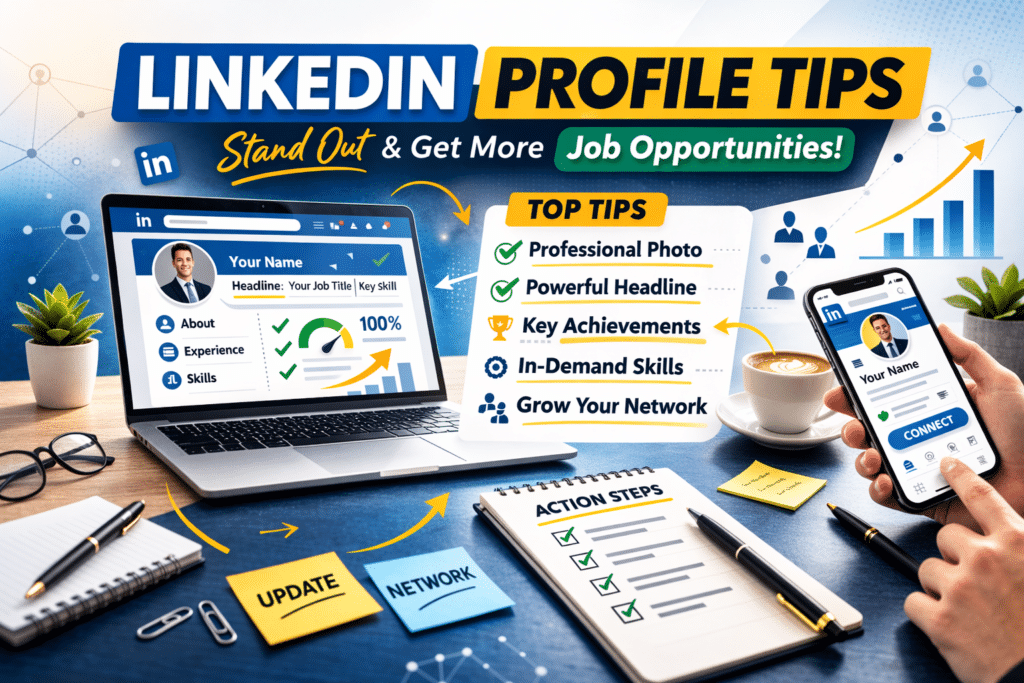
If you’re searching for practical LinkedIn profile tips, you’re probably trying to improve your visibility, attract recruiters, or build a stronger professional presence online. And honestly, a well-built LinkedIn profile can open real opportunities—from job offers to networking connections.
But here’s the thing: most people treat LinkedIn like an online resume. That’s a mistake.
Your LinkedIn profile should act more like a personal landing page for your career. When done right, it shows your skills, your experience, and what you bring to the table in a clear and professional way.
In this guide, you’ll learn simple yet effective LinkedIn profile tips that help your profile look stronger, rank better in searches, and catch the attention of recruiters.
Why Your LinkedIn Profile Matters
Before we jump into the tips, let’s quickly talk about why your profile matters so much.
Recruiters often search LinkedIn before reaching out to candidates. In many cases, your profile is the first impression someone gets about your professional background.
A strong profile can help you:
- Appear in recruiter searches
- Build credibility in your field
- Attract job opportunities
- Grow your professional network
- Show your skills and experience clearly
And the good news? You don’t need years of experience to build a solid profile.
Quick Overview: Key Parts of a LinkedIn Profile
| Profile Section | Why It Matters |
|---|---|
| Profile Photo | Creates a professional first impression |
| Headline | Shows what you do and your value |
| About Section | Explains your background and goals |
| Experience | Highlights your work history |
| Skills | Helps your profile appear in searches |
| Recommendations | Adds credibility and trust |
Now let’s break down the most useful LinkedIn profile tips you can start using today.
1. Use a Professional Profile Photo
Your profile photo is the first thing people notice.
Profiles with photos receive far more views than those without one.
You don’t need an expensive photoshoot. Just follow a few simple guidelines:
Good LinkedIn photo tips:
- Use clear lighting
- Look directly at the camera
- Dress professionally
- Keep the background simple
- Smile naturally
Avoid group photos or cropped pictures.
A clean headshot works best.
2. Write a Clear and Strong Headline
Your headline appears right below your name. And it’s one of the most important parts of your profile.
Many people only list their job title. But that’s a missed opportunity.
Instead, use your headline to show what you do and how you help others.
Weak headline
Marketing Specialist
Better headline
Digital Marketing Specialist | SEO & Content Strategy | Helping Brands Grow Online
See the difference?
It tells people more about your skills.
3. Write an About Section That Sounds Human
The About section is where you introduce yourself.
But don’t treat it like a formal resume summary. Write it like you’re explaining your work to someone.
Keep it simple and clear.
Good About section structure
- Who you are
- What you do
- Your key skills
- What you’re interested in
Example structure:
Paragraph 1: Your background
Paragraph 2: Your skills and experience
Paragraph 3: What you’re currently focusing on
Keep it around 3–5 short paragraphs.
4. Add Relevant Keywords to Your Profile
LinkedIn works like a search engine.
Recruiters search for candidates using keywords like
- Project manager
- Data analyst
- Graphic designer
- Remote customer support
If those keywords appear in your profile, your chances of showing up in search results improve.
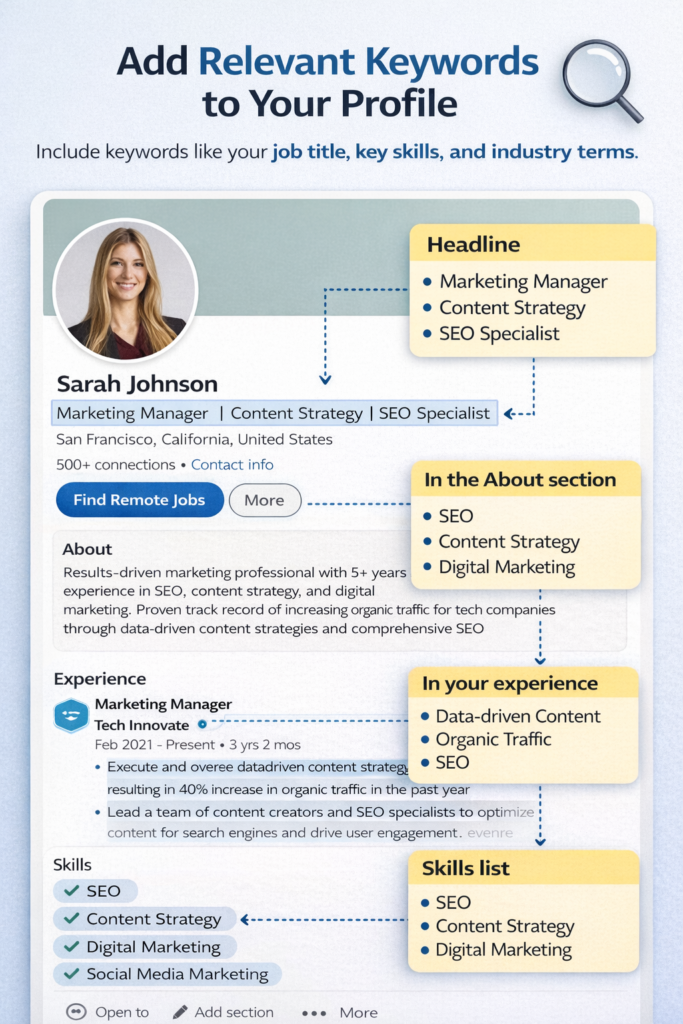
Best places to include keywords:
- Headline
- About section
- Experience descriptions
- Skills section
But keep it natural. Don’t repeat the same keyword too many times.
5. Show Real Achievements in Your Experience Section
Instead of listing duties, focus on results and accomplishments.
For example:
❌ Managed social media accounts
✅ Managed social media accounts and increased engagement by 35% in six months
Numbers make your work easier to understand.
If possible, include:
- percentages
- growth numbers
- project outcomes
Even small results matter.
6. Add Skills That Match Your Career
The Skills section helps LinkedIn understand what you’re good at.
And it also helps recruiters find your profile.
Choose skills related to your field.
For example:
| Career Field | Useful Skills |
|---|---|
| Marketing | SEO, Content Marketing, Social Media |
| IT | Python, Cloud Computing, Cybersecurity |
| Finance | Financial Analysis, Budgeting |
| Design | Adobe Photoshop, UX Design |
LinkedIn allows up to 50 skills, but you don’t need that many.
Focus on 10–20 relevant skills.
7. Ask for Recommendations
Recommendations are short reviews written by people you’ve worked with.
They add credibility to your profile.
You can request recommendations from:
- Managers
- Coworkers
- Clients
- Professors
A short message works fine.
Example request:
Hi [Name], I enjoyed working with you on the marketing project last year. Would you be comfortable writing a short recommendation for my LinkedIn profile?
Most people are happy to help.
8. Customize Your LinkedIn URL
LinkedIn automatically creates a long profile link.
Example:
linkedin.com/in/john-smith-8392842
You can change it to something cleaner.
Example:
linkedin.com/in/johnsmith
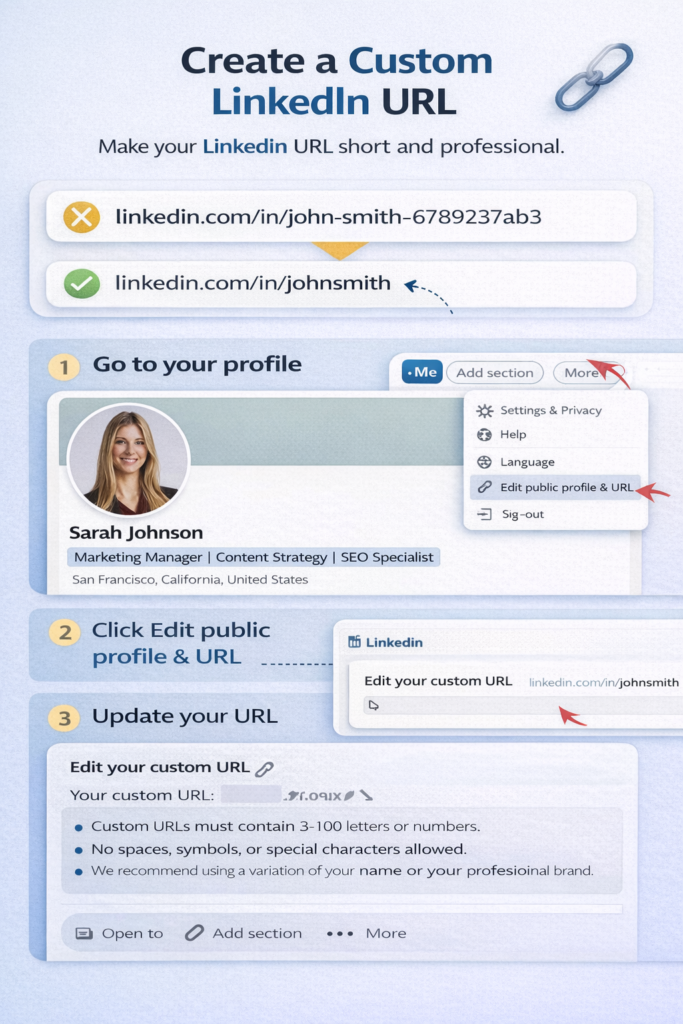
Steps to change it
- Go to your profile
- Click “Edit public profile & URL.”
- Click the pencil icon
- Update the link
This looks more professional and easier to share.
9. Add a Background Banner Image
Many people ignore the background image behind their profile photo.
But it’s a good chance to show something about your work.
Ideas for banner images:
- Industry-related graphics
- A simple professional design
- Your personal brand colors
- A city skyline or workspace
Just keep it clean and professional.
10. Stay Active on LinkedIn
A complete profile helps. But activity also matters.
Posting occasionally shows that you’re engaged in your field.
You don’t need to post every day.
Simple ideas:
- Share industry articles
- Comment on posts
- Write short insights
- Share career updates
Even a few interactions per week can increase visibility.
Step-by-Step: How to Improve Your LinkedIn Profile Today
If you want a quick improvement plan, follow this checklist.
Step 1
Upload a professional profile photo.
Step 2
Write a headline that includes your main skills.
Step 3
Update your About section with a short personal introduction.
Step 4
Add achievements to your experience descriptions.
Step 5
Add 10–20 relevant skills.
Step 6
Request at least one recommendation.
Step 7
Customize your LinkedIn URL.
You can finish most of this in under one hour.
Common LinkedIn Profile Mistakes
Even small mistakes can make a profile look weaker.
Here are a few things to avoid.
Incomplete profiles
Profiles missing sections often appear less trustworthy.
Too many buzzwords
Words like “hard-working” or “motivated” don’t show real value.
No profile photo
This can make your profile look inactive.
Long paragraphs
Keep text short and easy to read.
FAQ: LinkedIn Profile Tips
How often should I update my LinkedIn profile?
You should review your profile every few months. Update it whenever you gain new skills, complete projects, or change roles.
What should I write in my LinkedIn headline?
Your headline should show your job role and key skills. Try to include keywords recruiters might search for.
Example:
Content Writer | SEO & Blogging | Helping Businesses Grow Online
Do recruiters really look at LinkedIn profiles?
Yes. Many recruiters use LinkedIn to search for candidates and review their professional background before contacting them.
How many skills should I list on LinkedIn?
Around 10–20 relevant skills is a good range. Focus on skills that match your career goals.
Is LinkedIn useful for beginners?
Absolutely. Even students and early-career professionals can use LinkedIn to build connections, show projects, and find opportunities.
Conclusion
Using the right LinkedIn profile tips can make a real difference in how people see your professional profile online.
A strong profile doesn’t need to be complicated. It just needs to be clear, honest, and focused on your strengths.
Start with the basics:
- Add a professional photo
- Write a clear headline
- Update your About section
- Show real achievements
- List relevant skills
Small improvements like these can make your profile more visible — and more appealing to recruiters.
Take some time today to update your LinkedIn profile. You might be surprised how much of a difference it makes.